# Gallery: Scientific Plot Organizer
[](https://www.python.org/downloads/)
[](https://opensource.org/licenses/MIT)
**Create responsive HTML galleries for scientific plot collections. Convert PDFs to PNG, organize plots hierarchically, and generate beautiful static websites.**
## Features
### Core Functionality
- **PDF to PNG Conversion**: Automatic high-quality thumbnail generation using ImageMagick
- **Incremental Updates**: Only processes files when source is newer than target
- **Responsive Design**: Mobile-friendly interface with multiple view modes
- **Hierarchical Organization**: Support for nested folder structures
- **Search & Navigation**: Real-time search with fuzzy matching
### Advanced Features
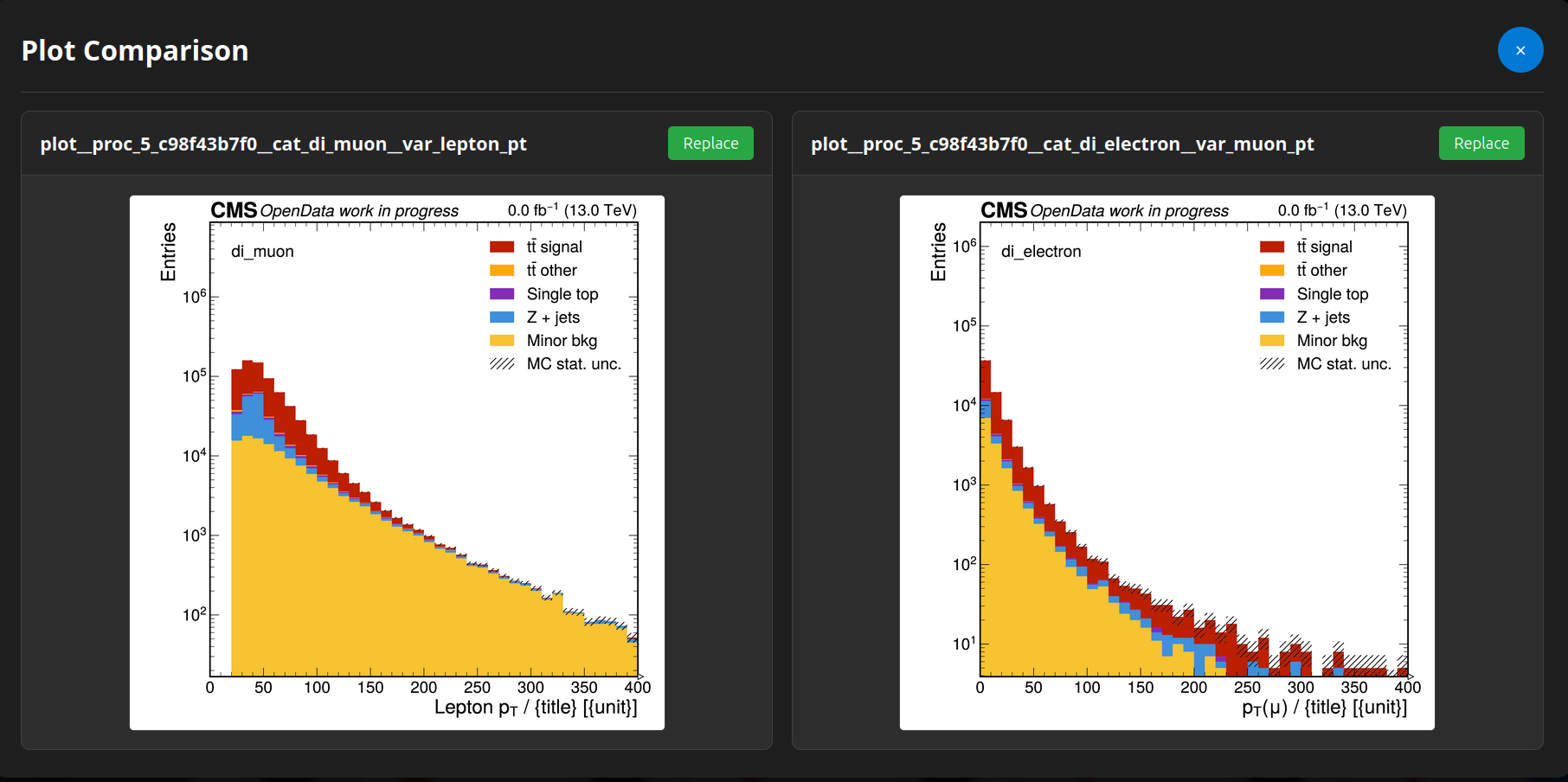
- **Plot Comparison**: Side-by-side comparison tool for analyzing differences
- **Metadata Management**: YAML/JSON metadata with inheritance and display, to properly label each folder
- **Recent Plots**: Quick access to recently viewed items
- **Theme Support**: Dark/light theme toggle
- **Keyboard Shortcuts**: Power-user navigation
### Developer-Friendly
- **Python API**: Import and use programmatically in other projects
- **CLI Interface**: Command-line command `gallery` with subcommands
- **TUI Interface**: Textual-based terminal UI `gallery tui`
- **Configuration Flexibility**: Config file stored under user `$HOME/.config/gallery`
- **Source Override**: Process single directories without full regeneration
## 📸 Screenshots
### Main Gallery View

### Metadata Display

### Plot Comparison Tool
### Search Functionality
 ## 🚀 Installation
### From GitLab
Pip install:
```bash
pip install git+https://gitlab.etp.kit.edu/kschmidt/web
```
Or git clone and `pip install .`. After installation the `gallery` command is available in your shell. Verify with:
```bash
gallery --help
```
### Dependencies
- Python 3.8+
- Python packages are installed automatically by pip (Jinja2, PyYAML, PyMuPDF, Textual, argcomplete, platformdirs)
- [ImageMagick](https://imagemagick.org/) is **optional** — used as a fallback if PyMuPDF is not available
### Shell Completion (optional)
Install tab-completion for bash/zsh/fish:
```bash
gallery install-completion
```
Then restart your shell or follow the printed instructions to activate it.
## 🖥️ CLI Usage
The `gallery` command has four subcommands: `generate`, `config`, `tui`, and `install-completion`.
### Quick start
```bash
# 1. Set your web output directory
gallery config set paths.web_folder /path/to/your/public_html
# 2. Add one or more plot source directories
gallery config add-source --path /path/to/plots --name my_analysis
# 3. Generate the gallery
gallery generate
```
### `gallery generate`
```bash
# Full regeneration
gallery generate
# Verbose output
gallery generate --verbose
# Clean rebuild (delete output before generating)
gallery generate --clean
# Regenerate a single source only
gallery generate --source /path/to/plots
# Use a non-default config file
gallery --config /path/to/config.yaml generate
```
### `gallery config`
```bash
# Show all configuration values
gallery config list
# Show the resolved config file path
gallery config path
# List configured sources
gallery config sources
# Get a single value
gallery config get gallery.png_dpi
# Set a value (all standard YAML types accepted)
gallery config set gallery.png_dpi 300
gallery config set metadata.cache_enabled true
# Add a source directory
gallery config add-source --path /path/to/plots --name my_plots
# Remove a source
gallery config remove-source my_plots
```
### Serving locally
```bash
python -m http.server 8000 -d /path/to/public_html
```
Then open `http://localhost:8000/gallery/` in your browser.
## 🖱️ TUI Usage
The TUI is a terminal user interface built with [Textual](https://textual.textualize.io/). It lets you edit the configuration and trigger generation without leaving your terminal.
```bash
gallery tui
```
### TUI Overview
The TUI is divided into collapsible sections and a persistent footer:
| Section | Contents |
|---------|----------|
| **Paths** | Web output folder |
| **Gallery Settings** | Plot root, PNG DPI, backup folder, cache and metadata options |
| **Sources** | Editable list of source directories — add or remove rows inline |
| **Generation** | Status indicator, scrollable log output |
The **footer bar** is always visible at the bottom:
| Button | Keyboard | Action |
|--------|----------|--------|
| Save Config | `Ctrl+S` | Write current values to config file |
| Generate | — | Run `gallery generate` in background |
| Quit | `Ctrl+Q` | Exit the TUI |
An **unsaved changes indicator** (`● unsaved changes`) appears in the title bar whenever a field has been modified but not yet saved.
Generation runs in a background thread and streams output line-by-line into the log widget. The status button changes colour: blue (idle) → yellow (running) → green (success) / red (error).
## ⚙️ Configuration
The config file lives at `$HOME/.config/gallery/config.yaml` by default. You can point to a different file with `gallery --config /path/to/config.yaml `.
### config.yaml Structure
```yaml
paths:
web_folder: "/web/user/public_html" # required
gallery:
plot_root: "gallery" # subdirectory inside web_folder
png_dpi: 400 # thumbnail resolution
backup_folder: "" # optional backup path
sources:
- name: "analysis_results"
path: "/path/to/plots/directory"
- name: "specific_plot"
path: "/path/to/another/directory"
metadata:
cache_enabled: true
inherit_from_parent: true
```
### Metadata Files
Create `metadata.yaml` files in your source directories. Fields are arbitrary and rendered via YAML object interpretation (dict, list, …). Lower-level files override parent values — useful for labelling specific experiments.
```yaml
# metadata.yaml
title: "Analysis Results"
description: "Results for my analysis"
experiment: "CMS"
dataset: "Run2_2016_nano_v9"
parameters:
luminosity: "35.9 fb^{-1}"
center_of_mass_energy: "13 TeV"
selection: "baseline"
tags:
- "physics"
- "analysis"
- "cms"
authors:
- "Researcher A"
- "Researcher B"
```
LaTeX formulas are supported in metadata values and rendered with MathJax:
```yaml
formula: "$$E = mc^2$$"
```
## 🎮 User Interface Guide
### Navigation Controls
| Button | Function | Keyboard Shortcut |
|--------|----------|-------------------|
| 🔍 Search | Real-time plot search | `Ctrl+K` |
| 📋 Recent | Recently viewed plots | `Ctrl+R` |
| ⚖️ Compare | Side-by-side comparison | `Ctrl+C` |
| ☀️ Theme | Toggle dark/light theme | `Ctrl+T` |
### View Modes
- **Grid View**: Thumbnail grid with metadata overlay
- **Large List**: Detailed list with larger previews
- **Compact List**: Dense list for quick scanning
## 🛠️ Development Guide
### Project Structure
```
gallery/
├── api.py # generate() — primary public entry point
├── builder.py # build_gallery() recursive traversal; template/assets
├── cli.py # gallery CLI command (argparse + argcomplete)
├── tui.py # gallery tui (Textual TUI)
├── config/
│ └── __init__.py # GalleryConfig, GallerySource, ConfigManager
├── utils/
│ ├── metadata.py # YAML/JSON loading, inheritance, caching
│ ├── processing.py # PDF→PNG conversion; needs_update(); render_gallery_page()
│ ├── stats.py # Directory size/file count statistics
│ ├── backup.py # Backup functionality
│ └── datetime_utils.py # Date/time utilities for templates
├── templates/
│ └── gallery.html # Single Jinja2 template for all pages
└── assets/
├── css/ # Modular CSS; main.css imports all via @import
└── js/ # Vanilla ES modules; GalleryApp orchestrates all managers
```
### Running Tests
```bash
pytest tests/
pytest tests/test_generate_gallery.py -v
pytest tests/test_generate_gallery.py::test_needs_update_missing_target -v
```
### Adding New Features
#### CSS component
```css
/* gallery/assets/css/new-feature.css */
.new-feature { }
```
Add `@import url('./new-feature.css');` to `main.css`.
#### JavaScript module
```javascript
// gallery/assets/js/new-feature.js
export class NewFeature { ... }
```
Import in `gallery-app.js` and instantiate in `GalleryApp`.
## 🔧 Troubleshooting
### Common Issues
| Issue | Solution |
|-------|----------|
| `gallery` command not found | Run `pip install -e .` from the repo root |
| PDF conversion fails — no renderer | Install PyMuPDF: `pip install pymupdf` (or `apt-get install imagemagick` as fallback) |
| PDF conversion fails — corrupt file | Verify the PDF opens in a viewer; try `pip install --upgrade pymupdf` |
| Permission denied on web dir | Check file permissions and web directory access |
| Metadata not showing | Check YAML syntax with `python -c "import yaml; yaml.safe_load(open('metadata.yaml'))"` |
### ImageMagick memory limits (fallback backend only)
```bash
export MAGICK_MEMORY_LIMIT=2GB
export MAGICK_MAP_LIMIT=2GB
gallery generate --verbose
```
### Debug / clean rebuild
```bash
gallery generate --verbose
gallery generate --clean --verbose
```
## 📄 License
This project is licensed under the MIT License — see the [LICENSE](LICENSE) file for details.
## 🙏 Acknowledgments
### Disclaimer
This project was made *entirely* using Claude Sonnet 4.0 and GPT 4.1. 100% of the code was AI generated and no human hand was involved other than prompting the Agent. I do not claim any part of this project as my own work.
### Packages
- **PyMuPDF** for PDF to PNG conversion (pure Python, no system dependencies)
- **ImageMagick** as optional fallback PDF renderer
- **Jinja2** for templating
- **Textual** for the terminal UI
- **MathJax** for LaTeX rendering
- **PyYAML** for YAML processing
- **argcomplete** for shell tab-completion
## 🔗 Links
- [Example Gallery](https://etpwww.etp.kit.edu/~kschmidt/gallery/index.html)
## 🚀 Installation
### From GitLab
Pip install:
```bash
pip install git+https://gitlab.etp.kit.edu/kschmidt/web
```
Or git clone and `pip install .`. After installation the `gallery` command is available in your shell. Verify with:
```bash
gallery --help
```
### Dependencies
- Python 3.8+
- Python packages are installed automatically by pip (Jinja2, PyYAML, PyMuPDF, Textual, argcomplete, platformdirs)
- [ImageMagick](https://imagemagick.org/) is **optional** — used as a fallback if PyMuPDF is not available
### Shell Completion (optional)
Install tab-completion for bash/zsh/fish:
```bash
gallery install-completion
```
Then restart your shell or follow the printed instructions to activate it.
## 🖥️ CLI Usage
The `gallery` command has four subcommands: `generate`, `config`, `tui`, and `install-completion`.
### Quick start
```bash
# 1. Set your web output directory
gallery config set paths.web_folder /path/to/your/public_html
# 2. Add one or more plot source directories
gallery config add-source --path /path/to/plots --name my_analysis
# 3. Generate the gallery
gallery generate
```
### `gallery generate`
```bash
# Full regeneration
gallery generate
# Verbose output
gallery generate --verbose
# Clean rebuild (delete output before generating)
gallery generate --clean
# Regenerate a single source only
gallery generate --source /path/to/plots
# Use a non-default config file
gallery --config /path/to/config.yaml generate
```
### `gallery config`
```bash
# Show all configuration values
gallery config list
# Show the resolved config file path
gallery config path
# List configured sources
gallery config sources
# Get a single value
gallery config get gallery.png_dpi
# Set a value (all standard YAML types accepted)
gallery config set gallery.png_dpi 300
gallery config set metadata.cache_enabled true
# Add a source directory
gallery config add-source --path /path/to/plots --name my_plots
# Remove a source
gallery config remove-source my_plots
```
### Serving locally
```bash
python -m http.server 8000 -d /path/to/public_html
```
Then open `http://localhost:8000/gallery/` in your browser.
## 🖱️ TUI Usage
The TUI is a terminal user interface built with [Textual](https://textual.textualize.io/). It lets you edit the configuration and trigger generation without leaving your terminal.
```bash
gallery tui
```
### TUI Overview
The TUI is divided into collapsible sections and a persistent footer:
| Section | Contents |
|---------|----------|
| **Paths** | Web output folder |
| **Gallery Settings** | Plot root, PNG DPI, backup folder, cache and metadata options |
| **Sources** | Editable list of source directories — add or remove rows inline |
| **Generation** | Status indicator, scrollable log output |
The **footer bar** is always visible at the bottom:
| Button | Keyboard | Action |
|--------|----------|--------|
| Save Config | `Ctrl+S` | Write current values to config file |
| Generate | — | Run `gallery generate` in background |
| Quit | `Ctrl+Q` | Exit the TUI |
An **unsaved changes indicator** (`● unsaved changes`) appears in the title bar whenever a field has been modified but not yet saved.
Generation runs in a background thread and streams output line-by-line into the log widget. The status button changes colour: blue (idle) → yellow (running) → green (success) / red (error).
## ⚙️ Configuration
The config file lives at `$HOME/.config/gallery/config.yaml` by default. You can point to a different file with `gallery --config /path/to/config.yaml `.
### config.yaml Structure
```yaml
paths:
web_folder: "/web/user/public_html" # required
gallery:
plot_root: "gallery" # subdirectory inside web_folder
png_dpi: 400 # thumbnail resolution
backup_folder: "" # optional backup path
sources:
- name: "analysis_results"
path: "/path/to/plots/directory"
- name: "specific_plot"
path: "/path/to/another/directory"
metadata:
cache_enabled: true
inherit_from_parent: true
```
### Metadata Files
Create `metadata.yaml` files in your source directories. Fields are arbitrary and rendered via YAML object interpretation (dict, list, …). Lower-level files override parent values — useful for labelling specific experiments.
```yaml
# metadata.yaml
title: "Analysis Results"
description: "Results for my analysis"
experiment: "CMS"
dataset: "Run2_2016_nano_v9"
parameters:
luminosity: "35.9 fb^{-1}"
center_of_mass_energy: "13 TeV"
selection: "baseline"
tags:
- "physics"
- "analysis"
- "cms"
authors:
- "Researcher A"
- "Researcher B"
```
LaTeX formulas are supported in metadata values and rendered with MathJax:
```yaml
formula: "$$E = mc^2$$"
```
## 🎮 User Interface Guide
### Navigation Controls
| Button | Function | Keyboard Shortcut |
|--------|----------|-------------------|
| 🔍 Search | Real-time plot search | `Ctrl+K` |
| 📋 Recent | Recently viewed plots | `Ctrl+R` |
| ⚖️ Compare | Side-by-side comparison | `Ctrl+C` |
| ☀️ Theme | Toggle dark/light theme | `Ctrl+T` |
### View Modes
- **Grid View**: Thumbnail grid with metadata overlay
- **Large List**: Detailed list with larger previews
- **Compact List**: Dense list for quick scanning
## 🛠️ Development Guide
### Project Structure
```
gallery/
├── api.py # generate() — primary public entry point
├── builder.py # build_gallery() recursive traversal; template/assets
├── cli.py # gallery CLI command (argparse + argcomplete)
├── tui.py # gallery tui (Textual TUI)
├── config/
│ └── __init__.py # GalleryConfig, GallerySource, ConfigManager
├── utils/
│ ├── metadata.py # YAML/JSON loading, inheritance, caching
│ ├── processing.py # PDF→PNG conversion; needs_update(); render_gallery_page()
│ ├── stats.py # Directory size/file count statistics
│ ├── backup.py # Backup functionality
│ └── datetime_utils.py # Date/time utilities for templates
├── templates/
│ └── gallery.html # Single Jinja2 template for all pages
└── assets/
├── css/ # Modular CSS; main.css imports all via @import
└── js/ # Vanilla ES modules; GalleryApp orchestrates all managers
```
### Running Tests
```bash
pytest tests/
pytest tests/test_generate_gallery.py -v
pytest tests/test_generate_gallery.py::test_needs_update_missing_target -v
```
### Adding New Features
#### CSS component
```css
/* gallery/assets/css/new-feature.css */
.new-feature { }
```
Add `@import url('./new-feature.css');` to `main.css`.
#### JavaScript module
```javascript
// gallery/assets/js/new-feature.js
export class NewFeature { ... }
```
Import in `gallery-app.js` and instantiate in `GalleryApp`.
## 🔧 Troubleshooting
### Common Issues
| Issue | Solution |
|-------|----------|
| `gallery` command not found | Run `pip install -e .` from the repo root |
| PDF conversion fails — no renderer | Install PyMuPDF: `pip install pymupdf` (or `apt-get install imagemagick` as fallback) |
| PDF conversion fails — corrupt file | Verify the PDF opens in a viewer; try `pip install --upgrade pymupdf` |
| Permission denied on web dir | Check file permissions and web directory access |
| Metadata not showing | Check YAML syntax with `python -c "import yaml; yaml.safe_load(open('metadata.yaml'))"` |
### ImageMagick memory limits (fallback backend only)
```bash
export MAGICK_MEMORY_LIMIT=2GB
export MAGICK_MAP_LIMIT=2GB
gallery generate --verbose
```
### Debug / clean rebuild
```bash
gallery generate --verbose
gallery generate --clean --verbose
```
## 📄 License
This project is licensed under the MIT License — see the [LICENSE](LICENSE) file for details.
## 🙏 Acknowledgments
### Disclaimer
This project was made *entirely* using Claude Sonnet 4.0 and GPT 4.1. 100% of the code was AI generated and no human hand was involved other than prompting the Agent. I do not claim any part of this project as my own work.
### Packages
- **PyMuPDF** for PDF to PNG conversion (pure Python, no system dependencies)
- **ImageMagick** as optional fallback PDF renderer
- **Jinja2** for templating
- **Textual** for the terminal UI
- **MathJax** for LaTeX rendering
- **PyYAML** for YAML processing
- **argcomplete** for shell tab-completion
## 🔗 Links
- [Example Gallery](https://etpwww.etp.kit.edu/~kschmidt/gallery/index.html)